Tax & Schedule E
Stop Dreading Tax Season
While other landlords are digging through shoeboxes in April, you'll generate your Schedule E in 30 seconds. Everything is organized year-round, exactly the way your accountant wants it.
No credit card required.
How It Works
From daily transactions to tax-ready reports in four simple steps
You're Always Tax-Ready
Every receipt you upload, every rent payment you record, every bank transaction you sync—we're categorizing it in real-time to the correct Schedule E line item.
You're not "catching up" during tax season. You're already done.
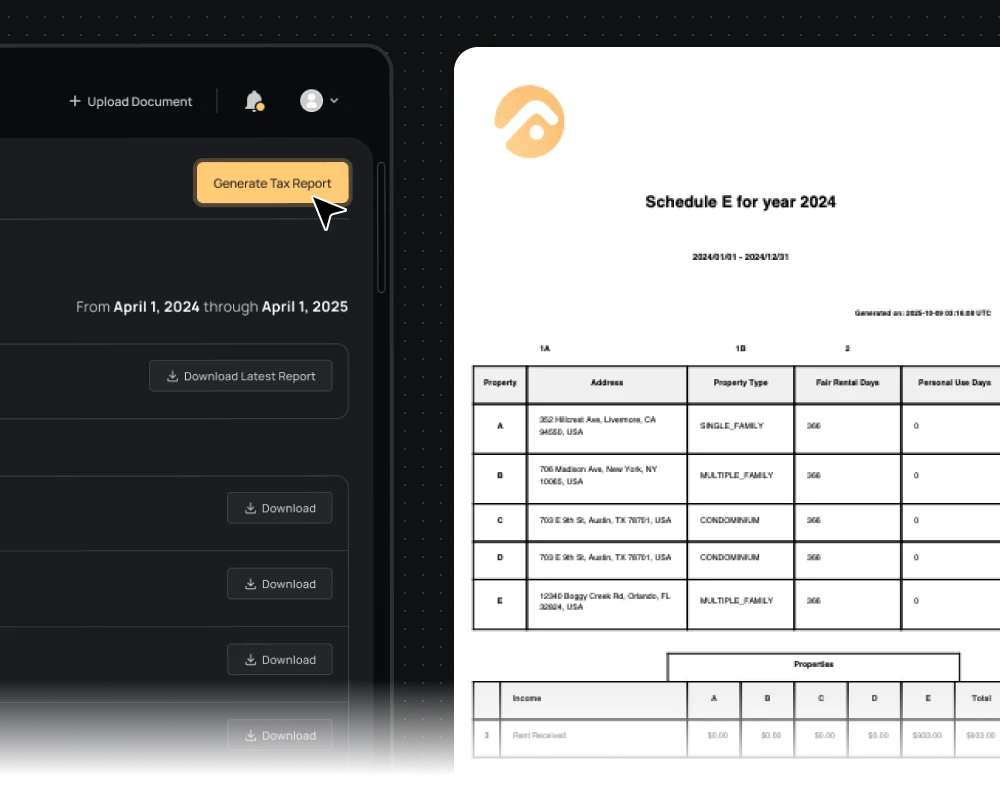
Click Export. Schedule E Appears
When you need your tax reports, click "Generate Tax Report" and choose from:
Schedule E
IRS-ready rental income and expense report
General Ledger
Complete transaction history by property
Income Statement
Profit/loss breakdown by month and property
Cash Flow Statement
Track how money moved through your properties
Add Mortgage Interest
Update your mortgage interest and insurance details, or upload your Form 1098 directly. We'll incorporate it automatically.
Download and Send to Your CPA
All reports export in IRS-accepted formats (PDF, Excel, CSV). Your accountant will actually thank you.
My accountant said it was the cleanest books he'd seen in 15 years.

David K.
5-property landlord
Migrated seamlessly
Never Miss a Tax Deduction Again
Most landlords lose money by forgetting legitimate deductions. FourCasa tracks every expense category the IRS cares about, automatically.
We capture everything:
Advertising & Marketing
Listing fees, Zillow ads, signage
Repairs vs. Improvements
Correctly separated (this matters for audits)
Mortgage Interest
Principal and interest split automatically
Insurance, Utilities, Management Fees
Always categorized correctly
The result? You claim every deduction you're entitled to. Your tax bill goes down. Your accountant's job gets easier.
More Than Just Schedule E
Year-End Summary
See total income, expenses, and net profit across all properties in one consolidated report
Depreciation Tracker
Track property basis and calculate depreciation automatically
Multi-Property Support
Generates combined and separate Schedule E, plus property-by-property breakdown.
Multi-Year Comparison
Compare this year vs. previous years to spot trends.
Built-In Tax Protection
Audit-Ready Documentation
Every expense is backed by a receipt and stored securely for IRS requirements
Repair vs. Improvement Guidance
We flag items that might need to be capitalized vs. expensed (this is where landlords get audited).
Human Verification on Tricky Items
When AI isn't 100% confident, our experts review before it goes in your books.
Your Accountant Will Love You
What you hand your accountant at tax time
| Before FourCasa | With FourCasa |
|---|---|
✗Shoe box of receipts | ✓Complete Schedule E (ready to review) |
✗Messy spreadsheets with errors | ✓Digital, organized expense log |
✗Missing Form 1099s and forms | ✓Organized General Ledger by Property |
✗Handwritten notes trying to explain transactions | ✓Clean Income and Cash Flow statements |
Before FourCasa
Shoe box of receipts
With FourCasa
Complete Schedule E (ready to review)
Before FourCasa
Messy spreadsheets with errors
With FourCasa
Digital, organized expense log
Before FourCasa
Missing Form 1099s and forms
With FourCasa
Organized General Ledger by Property
Before FourCasa
Handwritten notes trying to explain transactions
With FourCasa
Clean Income and Cash Flow statements
What landlords are saying
Never Stress About Taxes Again
Let FourCasa handle Schedule E and all your tax reports. Try it free.
No credit card required
Still have questions?
Email us: contact@fourcasa.com
Schedule a demo: Book your free 15-minute onboarding call
Common Tax Season Questions
Our AI doesn't guess. When confidence is below 100%, a human expert reviews and categorizes. You get AI speed with human accuracy.
You can edit any transaction before generating your Schedule E. Need to recategorize? Reallocate to a different property? Split between properties? Take 10 seconds.
Yes, FourCasa exports to Excel, CSV, and PDF. Your accountant can import in their tax software.
Schedule E is federal (IRS Form 1040). For state returns, FourCasa provides the detailed breakdown your state return needs.
Yes. Upload the previous year's transactions and documents. FourCasa will organize and generate historical Schedule E reports.
FourCasa stores all receipts, invoices, and documentation. Download everything organized by property and expense type. IRS auditors prefer this level of organization.